
Configure Earn Rule Calculation
The Calculation for an Earn Rule represents the mathematical formula for determining the Metric adjustment when a Member performs the selected Activity Type (and if the Condition is met).
Note: Defining the Calculation requires knowledge of the Groovy programming language. To assist with writing Groovy expressions, the platform provides a built-in evaluation tool. See Evaluate Earn Rules Expression for more information.
-
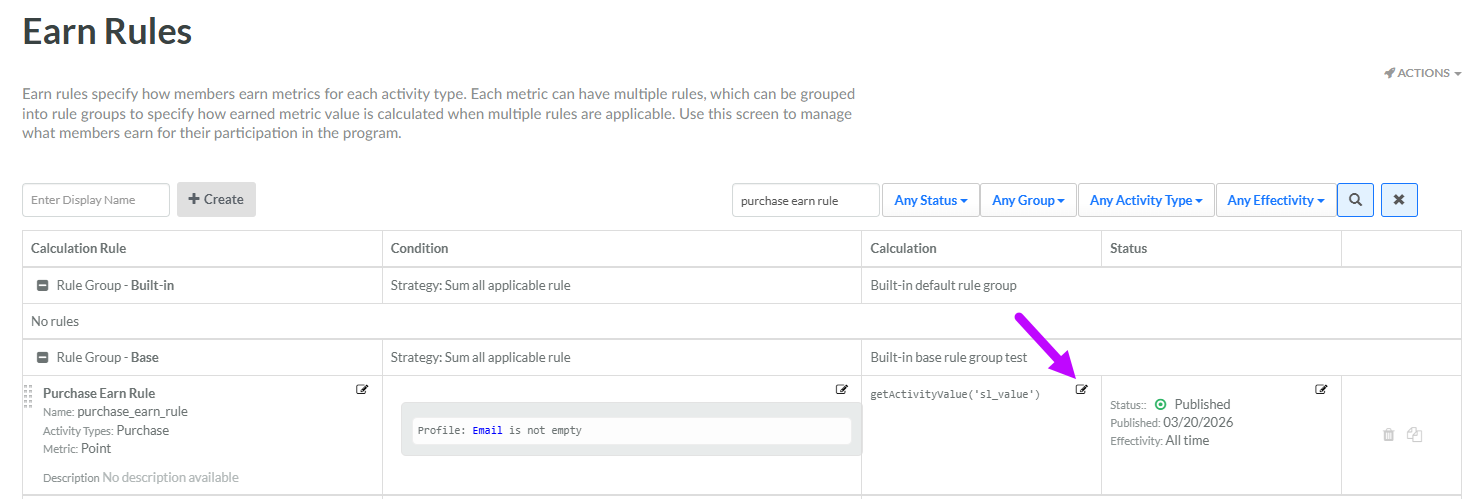
Select Rules from the top navigation bar, then select Earn Rules from the side navigation menu. The Earn Rules screen is displayed.
-
Optionally, search for the desired Earn Rule (see
-
Optionally, expand an Earn Rule Group by clicking the Expand icon next to its name.
-
Within the Calculation column of the desired Earn Rule, click the Edit icon. The Edit Earn Rule pop-up window is displayed.
-
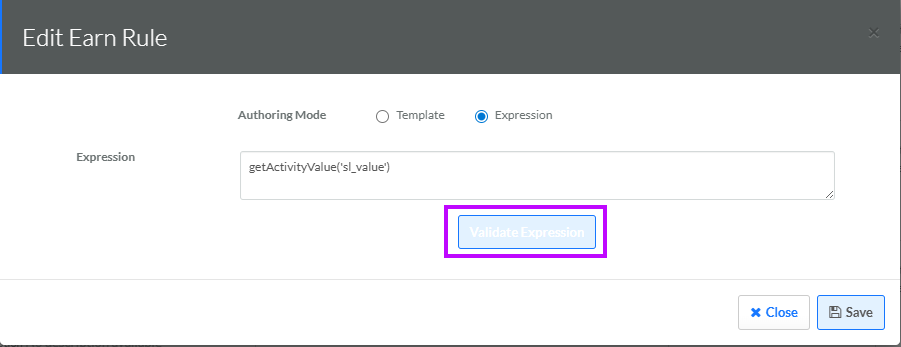
Next to Authoring Mode, select Expression.
-
In the Expression field, enter a Groovy expression.
-
Optionally, click Validate Expression to validate the Groovy code. A message is displayed, indicating the results of the validation.
-
Click Save. The expression is displayed within the Calculation column for this Earn Rule.
